Canny Edge Detection
Related Topics: Window Filters
Download: CannyEdge_win.zip
- Overview
- Smooth with Gaussian Filter
- Compute Horizontal/Vertical Gradients
- Compute Magnitude from Gradients
- Non-Maximal Suppression
- Process Hysteresis Threshold
- Example: Canny Edge (GUI)
Overview
Canny edge detection is a multi-stage edge detection algorithm to find single-pixel edges from the input image. It is a common image processing alorithm for computer vision.
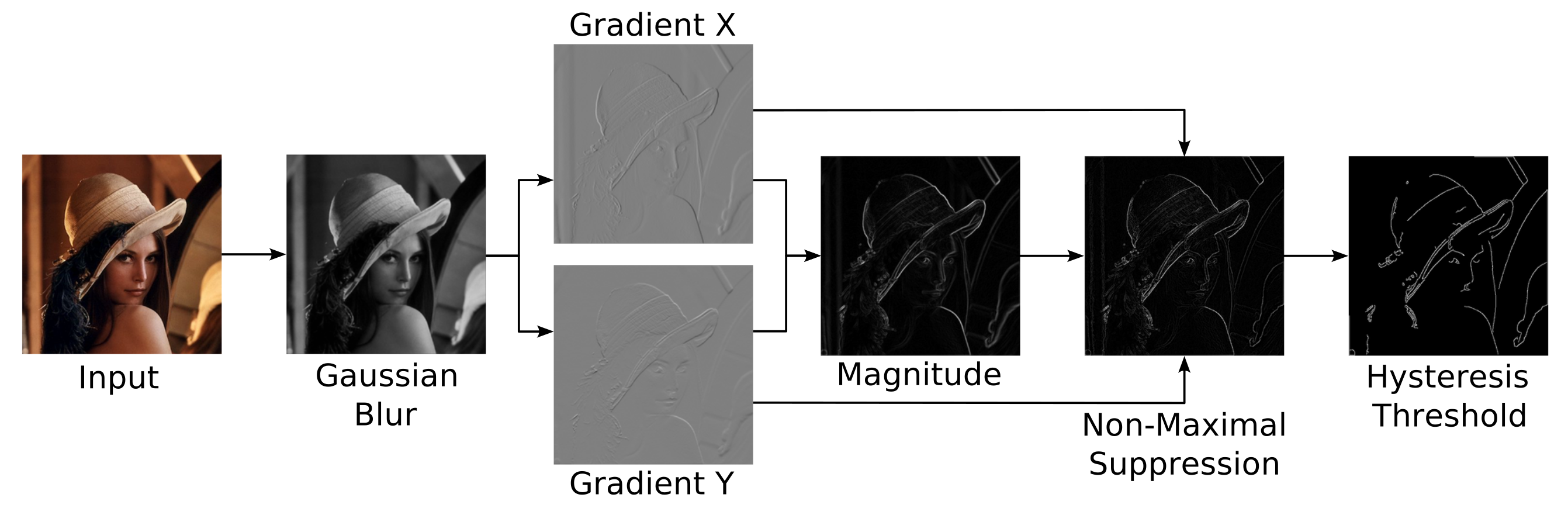
Canny edge detection requires multiple steps to process;
- Smooth with gaussian filter
- Compute h/v gradients
- Compute magnitude of gradients
- Perform Non-Maximal Suppression
- Perform Hysteresis Threshold
1) Smooth with Gaussian Filter
Convolve the input image with Gaussian kernel (filter) in order to remove high-frequency noise. It is useful to remove small-scale textures effectively. Because Gaussian kernel is separable, use 2D separable convolution for faster computation.
Check Gaussian smooth filter for more detail about Gaussian kernel.
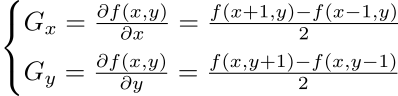
2) Compute Horizontal/Vertical Gradients
The gradient is the first-order derivatives of the image for horizontal or vertical direction. The gradient can be computed using central difference:
3) Compute Magnitude of Gradients
Finding the magnitude from horizontal and vertical gradients results in a rough detection of all possible edges in the image. The magnitude can be computed by:

However, the edge lines in the maginitude look thick. So we need to a thinning algorithm to find 1-pixel edge lines, which is Non-Maximal Suppression.
4) Non-Maximal Suppression (NMS)
Non-Maximal Suppression (NMS) is an edge-thinning algorithm. This process results in one-pixel wide ridges from thick edges. It requires horizontal and vertical gradients and the magnitude of the gradients.


The basic idea of NMS is that: If a pixel value is not greater than its neighbored pixels, then the pixel is not an edge (the scalar value of the pixel is set to zero).
During this process, it also needs to know the direction of the gradient vectors in order to find 2 neighbour magnitudes on the same direction, then to compare them with the current pixel. (mostly 4 or 8 directions are required)
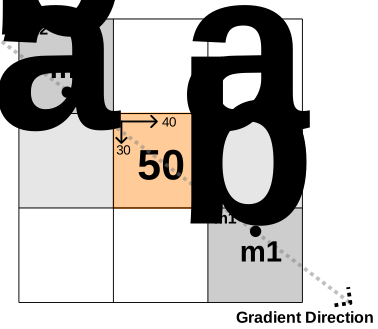
Suppose we test NMS at a pixel where its magnitude is 50, and gradients Gx=40 and Gy=30. First, find 4 neighbour pixels and their magnitudes along the gradient direction; m1a, m1b, m2a and m2b.
Then, calculate the weighted magnitudes m1 and m2 using linear interpolation with the weight, t from the gradient direction (slope).
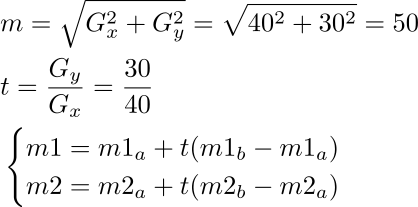
If the magnitude m is less than m1 or m2, then it is suppressed (mark it to 0).
5) Process Hysteresis Threshold
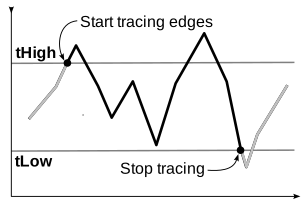
Hysteresis thresholding is used to remove the weak edges and plus, connect the splitted edges.
To connect edges, starting at a pixel which is greater than high treshold, tHigh and search all 8 surround neighbour pixels.
If the magnitude of the neighbour is greater than low threshold, tLow then it will also become an edge. Continue to trace the edges all 8 directions until the magnitude is less than tLow (possibly using a recursive routine).
The range of the normalized threshold is:

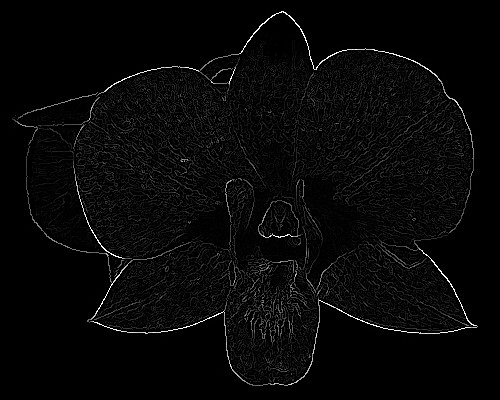
The following animation is tracing edges using hysteresis thresholding from a non-maximal suppression bitmap.

Example: Canny Edge (GUI)
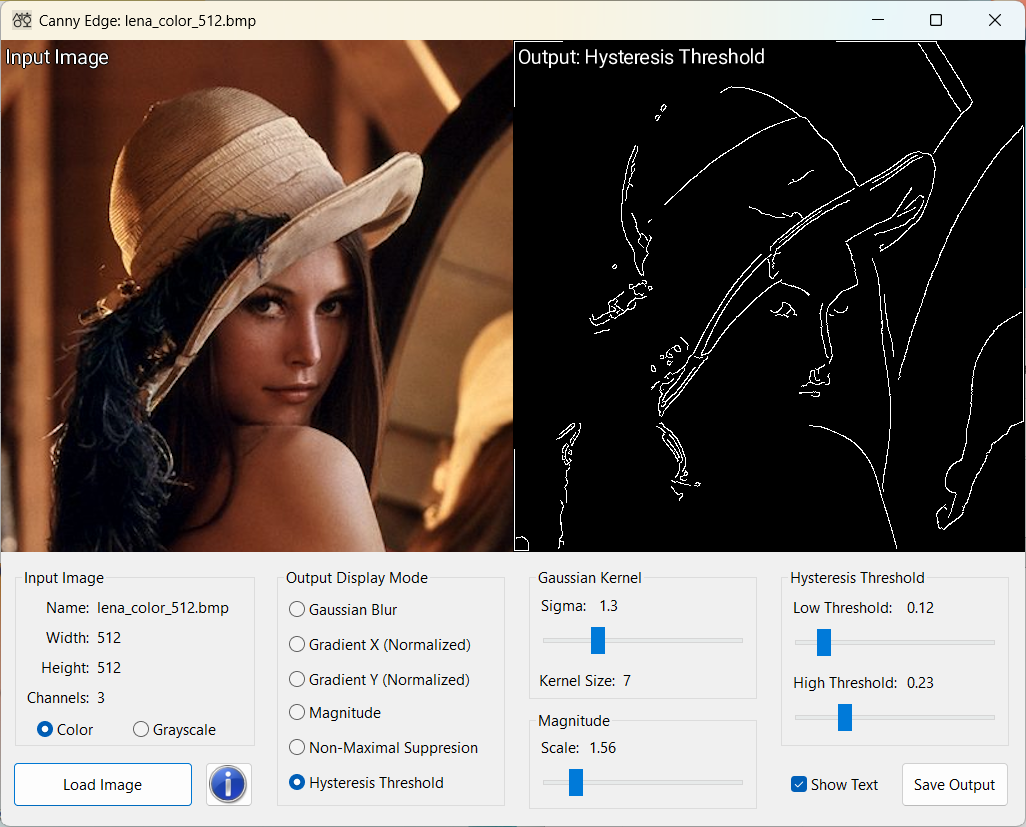
Download: CannyEdge_win.zip (Updated: 2026-02-01)
This C++ GUI application detects a single-pixel edges from an input image using Canny Edge detection algorithm. It allows to adjust several parameters using user interfaces, such as Gaussian sigma, low and high threshold values. You can also save the result to a PNG image file.

