Freeglut Binary
freeglut is an open-source GLUT (OpenGL Utility Toolkit) library, and is used to develop cross-platform OpenGL applications. This page provides the pre-compiled freeglut libraries (libs) and binaries (DLLs) for MinGW (g++) and Visual Studio (VC++) on Windows platform. The source code is available at freeglut project page. The source package includes CMake files, so, you can compile the binaries by yourself.
Freeglut Binary for MinGW (g++)
This package contains pre-compiled freeglut libraries for 32-bit and 64-bit MinGW on Windows.
- libfreeglut.dll: Shared dynamic link libraries (DLLs) under freeglut/bin folder
- libfreeglut.dll.a: Shared libraries under freeglut/lib folder
- libfreeglut_static.a: Static libraries under freeglut/lib folder
- Header files under freeglut/include folder
Download:
(SHA256 Hash: 78eb0630e4994bcaf099f6d4c21607d17cfeeec6de16dd6634ff05aaef490349)
Usage
For 64-bit MinGW, download the pre-compiled 64-bit GCC toolchain from WinLibs.com and compile/link with the shared library under freeglut/lib/x64 directory. Define FREEGLUT_STATIC macro if you want to link it statically.
// dynamic link for 64-bit
g++.exe -I./freeglut/include ...                                // compile
g++.exe -L./freeglut/lib/x64 -lfreeglut -lopengl32 ...          // link

// static link for 64-bit
g++.exe -DFREEGLUT_STATIC -I./freeglut/include ...              // compile
g++.exe -L./freeglut/lib/x64 -lfreeglut_static -lopengl32 ...   // link
For 32-bit MinGW, download 32-bit GCC toolchain from WinLibs.com and compile and link with the shared library under freeglut/lib directory.
// dynamic link for 32-bit
g++.exe -m32 -I./freeglut/include ...                           // compile
g++.exe -m32 -L./freeglut/lib -lfreeglut -lopengl32 ...         // link

// static link for 32-bit
g++.exe -m32 -DFREEGLUT_STATIC -I./freeglut/include ...         // compile
g++.exe -m32 -L./freeglut/lib -lfreeglut_static -lopengl32 ...  // link
Code::Blocks Project Settings
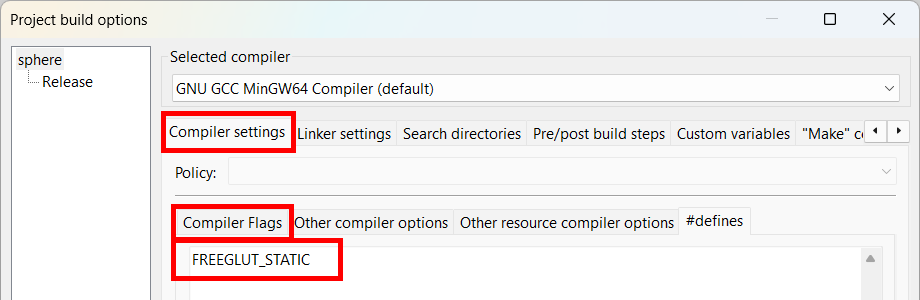
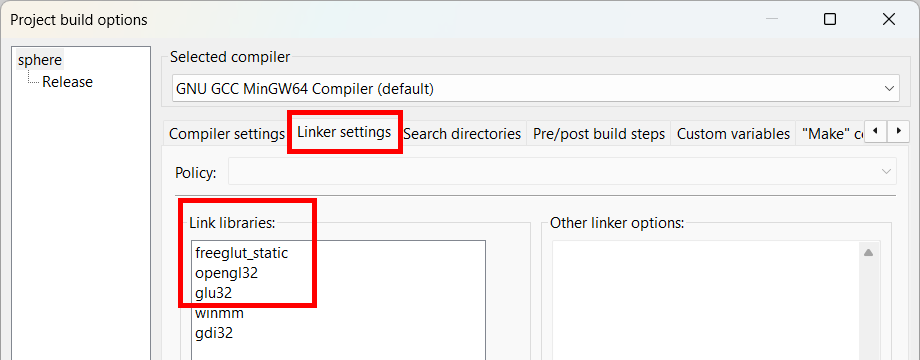
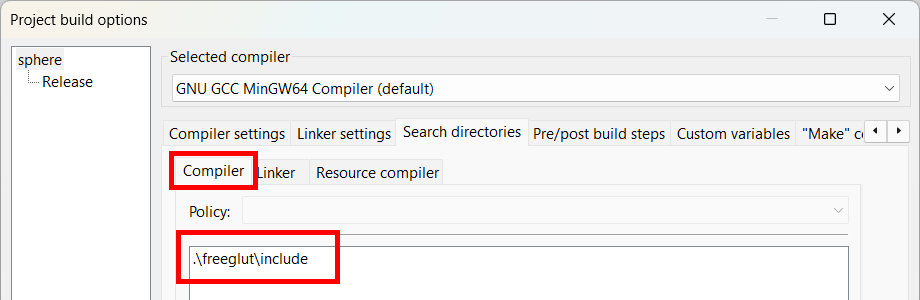
To build an OpenGL application statically linking freeglut with MinGW in Code::Blocks project, go to Project > Build options... dialog. Then, specify the directories of your freeglut and define FREEGLUT_STATIC macro and link with freeglut_static library. If you want to dynamic link freeglut, specify freeglut library only.

Freeglut Binary for MS VisualStudio (VC++)
This package contains pre-compiled 64-bit/32-bit freeglut libraries (lib & dll) for MS VisualStudio (VC++). The 64-bit versions are stored under x64 sub-directory.
- freeglut.dll: Shared dynamic link libraries (Release) under freeglut/bin folder
- freeglutd.dll: Shared dynamic link libraries (Debug) under freeglut/bin folder
- freeglut.lib: Shared libraries (Release) under freeglut/lib folder
- freeglutd.lib: Shared libraries (Debug) under freeglut/lib folder
- freeglut_static.lib: Static libraries (Release) under freeglut/lib folder
- freeglut_staticd.lib: Static libraries (Debug) under freeglut/lib folder
- Header files under freeglut/include folder
Download:
(SHA256 Hash: 6a24c16a6927529a8f7233eea5c0e294e266790fc617becd6e1af476c4fbd9a1)
Usage
For 64-bit platform, link with freeglut.lib or freeglutd.lib under freeglut/lib/x64 directory. Define FREEGLUT_STATIC macro if you want to link it statically. VisualStudio will automatically switch freeglut.lib or freeglutd.lib depending on release or debug configuration.
For 32-bit build, compile with the shared libraries under freeglut/lib directory instead.
MS VisualStudio Project Settings
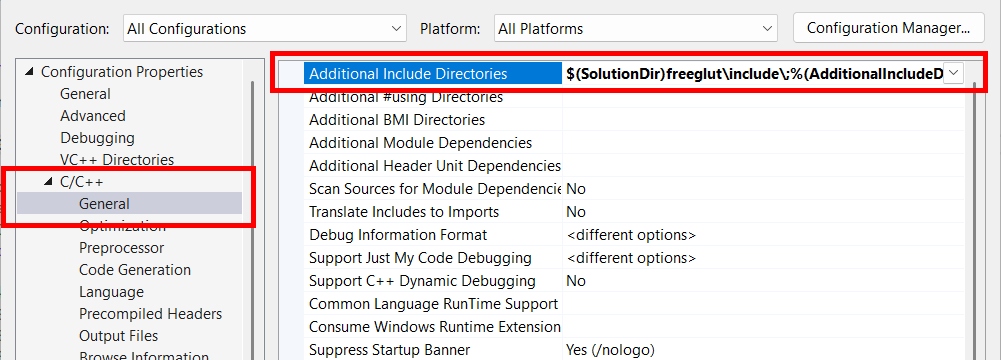
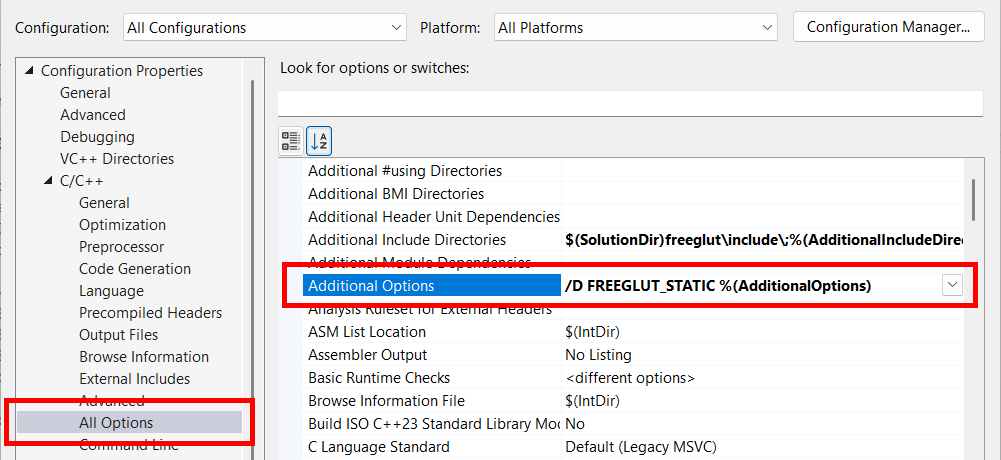
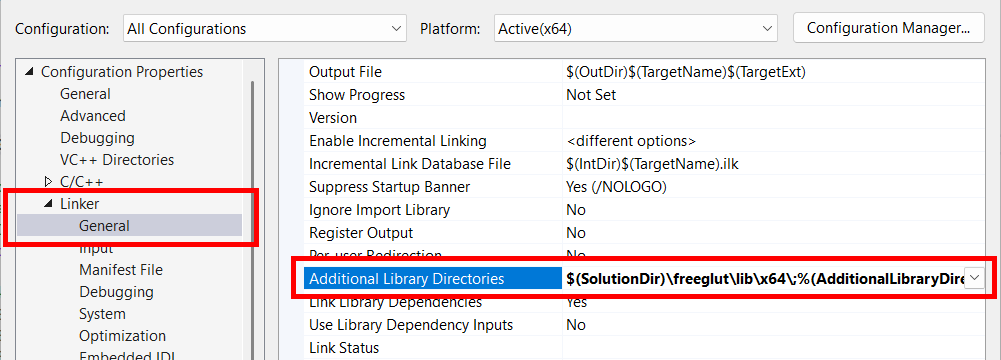
Copy the freeglut folder to the VS solution directory first. To build an OpenGL application statically linking freeglut in VisualStudio project, open the project property page. Then, specify the directories of your freeglut and define FREEGLUT_STATIC macro and link with freeglut_static.lib library. If you want linking freeglut dynamically, specify freeglut.lib library only.

Archive
Download old versions of freeglut libraries.

