STL (STereo Lithography)
Related Topics: OBJ Viewer, OpenGL Vertex Buffer Object
Download: stlModel.zip
- Overview
- STL ASCII Format
- STL Binary Format
- Example: StlModel Class (C++)
- Sample STL Files
- Example: WebGL STL Model (JavaScript)
Overview
STL (STereo Lithography) file is a 3D geometry file format, which is commonly used in 3D printing industry. It only represents the surface geometry with facets (triangles), but does not support the surface colour nor texture coordinates. STL format can be represented with both ASCII and binary format.
STL ASCII Format
STL ASCII file begins with solid keyword, and each triangle is defined by facet keyword in the next line. Each facet is requred the normal vector (nx, ny, nz) separated by space characters. Then, define a list of vertex positions (vx, vy, vz) to construct a triangle.
solid solidName
facet normal nx ny nz
    outer loop
        vertex vx vy vz
        vertex vx vy vz
        vertex vx vy vz
    endloop
endfacet
...
endsolid
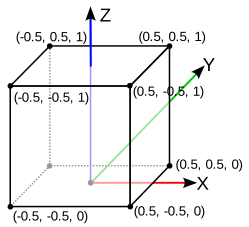
The following example is a STL file describing a unit cube positioned on the X-Y plane in ASCII format with 12 facets (triangles).
Note that the up axis in STL format is Z axis by default, and a triangle is constructed by counter-clockwise winding, same as OpenGL.
To determine if it is a ASCII or binary format, you may scan first 5 bytes from the file, and check if it contains "solid" characters in it.
You can download the file, cube_ascii.stl.
solid stl_model
 facet normal 0 0 1
  outer loop
   vertex -0.5 -0.5 1
   vertex  0.5 -0.5 1
   vertex  0.5  0.5 1
  endloop
 endfacet
 facet normal 0 0 1
  outer loop
   vertex  0.5  0.5 1
   vertex -0.5  0.5 1
   vertex -0.5 -0.5 1
  endloop
 endfacet
 facet normal 0 1 0
  outer loop
   vertex -0.5 0.5 1
   vertex  0.5 0.5 1
   vertex  0.5 0.5 0
  endloop
 endfacet
 facet normal 0 1 0
  outer loop
   vertex  0.5 0.5 0
   vertex -0.5 0.5 0
   vertex -0.5 0.5 1
  endloop
 endfacet
 facet normal 0 0 -1
  outer loop
   vertex -0.5  0.5 0
   vertex  0.5  0.5 0
   vertex  0.5 -0.5 0
  endloop
 endfacet
 facet normal 0 0 -1
  outer loop
   vertex  0.5 -0.5 0
   vertex -0.5 -0.5 0
   vertex -0.5  0.5 0
  endloop
 endfacet
 facet normal 0 -1 0
  outer loop
   vertex -0.5 -0.5 0
   vertex  0.5 -0.5 0
   vertex  0.5 -0.5 1
  endloop
 endfacet
 facet normal 0 -1 0
  outer loop
   vertex  0.5 -0.5 1
   vertex -0.5 -0.5 1
   vertex -0.5 -0.5 0
  endloop
 endfacet
 facet normal 1 0 0
  outer loop
   vertex 0.5 -0.5 1
   vertex 0.5 -0.5 0
   vertex 0.5  0.5 0
  endloop
 endfacet
 facet normal 1 0 0
  outer loop
   vertex 0.5  0.5 0
   vertex 0.5  0.5 1
   vertex 0.5 -0.5 1
  endloop
 endfacet
 facet normal -1 0 0
  outer loop
   vertex -0.5 -0.5 0
   vertex -0.5 -0.5 1
   vertex -0.5  0.5 1
  endloop
 endfacet
 facet normal -1 0 0
  outer loop
   vertex -0.5  0.5 1
   vertex -0.5  0.5 0
   vertex -0.5 -0.5 0
  endloop
 endfacet
endsolid
STL Binary Format
STL also supports a binary format. It begins with 80-byte long file header, then it follows a 4-byte long integer specifying the number of triangles in the STL file. After this, the binary file lists a multiple 50-byte chunks. Each 50-byte chunk describes a facet; 12 bytes for the face normal as float type, 36 bytes for 3 vertex positions (floats) and 2 bytes for paddings.
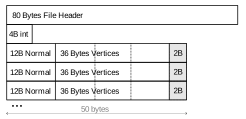
The advantage of the binary format is reducing the file size, for example, the binary version of a cube is only 684 bytes, but the ASCII format is 1509 bytes.
This is a code snippet using C++ std::ifstream to parse a binary STL file. Please see the detailed implementation in StlModel.cpp class.
std::ifstream inFile;
inFile.open(fileName, std::ios::binary);

// init arrays and vars
std::vector<Vector3> faceNormals;
std::vector<float> vertices;
char header[80];
int faceCount;      // 4-byte
float f[12];        // 48 bytes = n + v1 + v2 + v3
char space[2];      // padding

// 1. read file header
inFile.read(header, 80);

// 2. read # of facets
inFile.read((char*)&faceCount, 4);

// parse facets
for(int i = 0; i < faceCount; ++i)
{
    // 3. read 48 bytes
    inFile.read((char*)&f, 48);

    faceNormals.push_back(Vector3(f[0], f[1], f[2]));   // face normal
    vertices.push_back(f[3]);   // v1
    vertices.push_back(f[4]);
    vertices.push_back(f[5]);
    vertices.push_back(f[6]);   // v2
    vertices.push_back(f[7]);
    vertices.push_back(f[8]);
    vertices.push_back(f[9]);   // v3
    vertices.push_back(f[10]);
    vertices.push_back(f[11]);

    // 4. consume 2 bytes paddings
    inFile.read((char*)&space, 2);
}
Example: StlModel Class (C++)
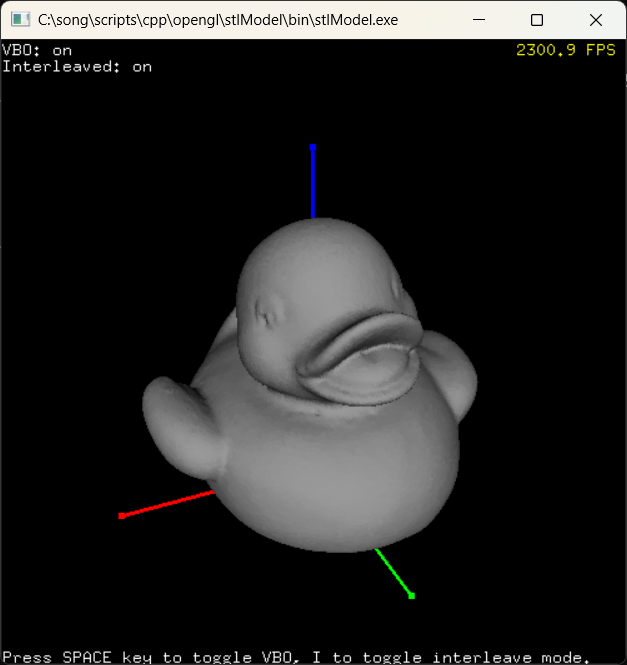
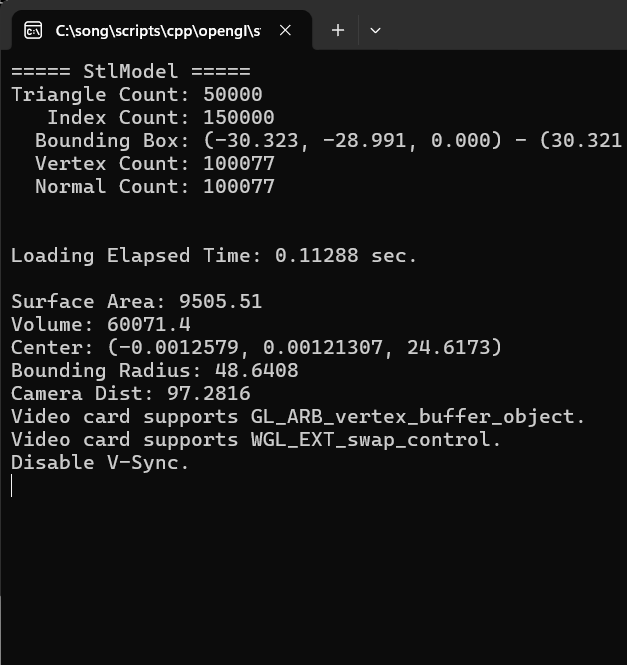
Download: stlModel.zip
StlModel C++ class is to load and save a STL file, and provides interfaces to pass vertex and index data to OpenGL.
- getVertices(): Return the vertex data as float*
- getNormals(): Return the normal data as float*
- getInterleavedVertices(): Return the vertex and normal data as float*
- getIndices(): Return the index data as unsigned int*
This is a code snippet to pass the vertex data to OpenGL's VBOs from StlModel class after loading a STL file.
// load STL model
StlModel stl;
stl.read("cube_ascii.stl");
stl.printSelf();     // print info

// copy interleaved vertex data (V + N) to VBO
glGenBuffers(1, &vbo);
glBindBuffer(GL_ARRAY_BUFFER, vbo);
const float* vertexData = stl.getInterleavedVertices();
unsigned int dataSize = stl.getInterleavedVertexSize();
glBufferData(GL_ARRAY_BUFFER, dataSize, vertexData, GL_STATIC_DRAW);

// copy index data to VBO
glGenBuffers(1, ibo);
glBindBuffer(GL_ELEMENT_ARRAY_BUFFER, ibo);
glBufferData(GL_ELEMENT_ARRAY_BUFFER,
             stl.getIndexCount()*sizeof(int),
             (void*)stl.getIndices(),
             GL_STATIC_DRAW);
...


// draw STL with VBOs
glBindBuffer(GL_ARRAY_BUFFER, vbo);
int stride = stl.getInterleavedStride();
glEnableVertexAttribArray(attribPosition);
glEnableVertexAttribArray(attribNormal);
glVertexAttribPointer(attribPosition, 3, GL_FLOAT, false, stride, 0);
glVertexAttribPointer(attribNormal, 3, GL_FLOAT, false, stride, (void*)(3*sizeof(float)));
glBindBuffer(GL_ELEMENT_ARRAY_BUFFER, ibo);
glDrawElements(GL_TRIANGLES, stl.getIndexCount(), GL_UNSIGNED_INT, 0);
Sample STL Files
Here are several STL models in ASCII or binary format. Note that the up vector of these models are Z axis.

- cube_ascii.stl (1509 bytes)
- cube_bin.stl (684 bytes)
- # of Polygons: 12 tris
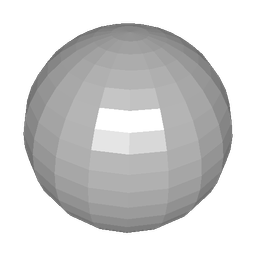
- sphere_ascii.stl (145 KB)
- sphere_bin.stl (37 KB)
- # of Polygons: 760 tris
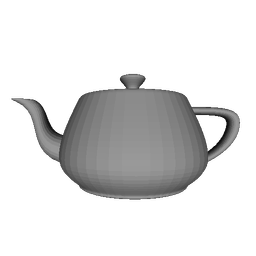
- teapot_solid.stl (461 KB, binary)
- # of Polygons: 9,438 tris
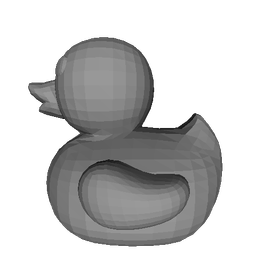
- duck_ascii.stl (786 KB)
- duck_bin.stl (195 KB)
- # of Polygons: 3,980 tris
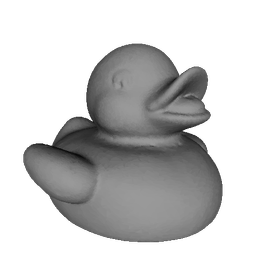
- debugger_5k.stl (244 KB, binary)
- # of Polygons: 5,000 tris
Example: WebGL STL Model (JavaScript)
This is a JavaScript version of StlModel class to parse and render a STL model using WebGL. You can download StlModel.js from GitHub repository. The fullscreen demo is available at test_stl.html.
// global object
gl = {};
...

// load STL file
gl.stl = new StlModel();
gl.stl.read("cube_ascii.stl").then(stl =>
{
    // loaded STL successfully
    initVBO(stl);       // copy vertex data to VBO
    console.log(stl);   // print STL info
});

function initVBO(stl)
{
    gl.vbo = gl.createBuffer();
    gl.bindBuffer(gl.ARRAY_BUFFER, gl.vbo);
    // total # of bytes
    let dataSize = stl.vertices.byteLength + stl.normals.byteLength;
    gl.bufferData(gl.ARRAY_BUFFER, dataSize, gl.STATIC_DRAW);
    // copy vertices
    gl.bufferSubData(gl.ARRAY_BUFFER, 0, stl.vertices);
    // copy normals
    gl.bufferSubData(gl.ARRAY_BUFFER, stl.vertices.byteLength, stl.normals);

    gl.ibo = gl.createBuffer();
    gl.bindBuffer(gl.ELEMENT_ARRAY_BUFFER, gl.ibo);
    // copy indices
    gl.bufferData(gl.ELEMENT_ARRAY_BUFFER, stl.indices, gl.STATIC_DRAW);
}
...

// draw VBO
gl.bindBuffer(gl.ARRAY_BUFFER, gl.vbo);
gl.vertexAttribPointer(program.attribute.position, 3, gl.FLOAT, false, 0, 0);
gl.vertexAttribPointer(program.attribute.normal, 3, gl.FLOAT, false, 0,
                       gl.stl.normals.byteLength);
gl.bindBuffer(gl.ELEMENT_ARRAY_BUFFER, gl.ibo);
gl.drawElements(gl.TRIANGLES, gl.stl.indices.length, gl.stl.indexType, 0);
...

