OpenGL Vertex Array Object (VAO)
Related Topics: Vertex Buffer Object, Vertex Array
Download: vao.zip, vaoShader.zip
Overview
The name, VAO (Vertex Array Object) looks somewhat related to vertexarray or VBO, but it is not. Vertex Array Object extension is for encapsulating vertex array states (size, type, stride, offset, etc.) and functions into it. Therefore, you can replace the multiple OpenGL calls with a single call of glBindVertexArray(), in order to setup various vertex array states and attributes before drawing.
You can dramatically reduce the function call overhead and organize the code much simpler with VAOs. But the overall performance gain is very minimal.
// draw without VAO
// need to set many states before drawing
glEnableClientState(GL_VERTEX_ARRAY);
glEnableClientState(GL_NORMAL_ARRAY);
glBindBuffer(GL_ARRAY_BUFFER, vboId);
glBindBuffer(GL_ELEMENT_ARRAY_BUFFER, iboId);
glVertexPointer(3, GL_FLOAT, 0, 0);
glNormalPointer(GL_FLOAT, 0, offset);
glDrawElements(...);
glBindBuffer(GL_ARRAY_BUFFER, 0);
glBindBuffer(GL_ELEMENT_ARRAY_BUFFER, 0);
glDisableClientState(GL_VERTEX_ARRAY);
glDisableClientState(GL_NORMAL_ARRAY);
// draw with VAO
// no need to reset states every drawing


glBindVertexArray(vaoId);
glDrawElements(...);
glBindVertexArray(0);
The vertex array states that can be stored in a VAO are;
- Position Attribute States: GL_VERTEX_ARRAY_SIZE, GL_VERTEX_ARRAY_TYPE, GL_VERTEX_ARRAY_STRIDE, GL_VERTEX_ARRAY_POINTER
- Normal Attribute States: GL_NORMAL_ARRAY_TYPE, GL_NORMAL_ARRAY_STRIDE, GL_NORMAL_ARRAY_POINTER
- Colour Attribute States: GL_COLOR_ARRAY_SIZE, GL_COLOR_ARRAY_TYPE, GL_COLOR_ARRAY_STRIDE, GL_COLOR_ARRAY_POINTER
- Texture Attribute States: GL_TEXTURE_COORD_ARRAY_SIZE, GL_TEXTURE_COORD_ARRAY_TYPE, GL_TEXTURE_COORD_ARRAY_STRIDE, GL_TEXTURE_COORD_ARRAY_POINTER
The following GL functions can be called within the bound VAO to encapsulate vertex array states:
- glBindBuffer()
- glBufferData()
- glBufferSubData()
- glVertexPointer()
- glNormalPointer()
- glColorPointer()
- glTexCoordPointer()
- glEnableClientState()
- glDisableClentState()
- glEnableVertexAttribArray()
- glDisableVertexAttribArray()
- glVertexAttribPointer()
However, the drawing related calls cannot be included in a VAO, for example;
- glDrawArrays()
- glDrawElements()
Usage of VAO
Using a VAO requires 3 steps;
- Generate a new VAO with glGenVertexArrays().
- Bind the VAO with glBindVertexArray().
- Invoke the vertex state related OpenGL functions.
glGenVertexArrays()
glGenVertexArrays() creates VAOs and return s the identifiers of vertex array objects. It requires 2 parameters; the first parameter is the number of objects to create, and the second parameter is the pointer to a VAO or array of VAOs to store identifiers as GLuint.
void glGenVertexArrays(GLsizei n, GLuint* ids)
glBindVertexArray()
glBindVertexArray() will bind a VAO, and any subsequent OpenGL calls to modify vertex array states will ne encapsulated into the bound VAO.
void glBindVertexArrays(GLuint* id)
glDeleteVertexArray()
If you don't need VAOs, you can delete a single or multiple VAOs using glDeleteVertexArrays().
void glDeleteVertexArrays(GLsizei n, GLuint* ids)
Name Zero VAO
In OpenGL version 3.3 Core Profile, the default vertex array object (the name zero) is removed. If VAO with ID 0 is bound and performing vertex array operations, it generates an invalid operation error. Therefore, the zero-named VAO is not allowed in the core profile. For example, glBindVertexArray(0) will generate an error.
(Reference: OpenGL v3.3, Apendix E.2.2, page 344)
To avoid this error, you can create a non-zero VAO as a default VAO in your program before any vertex array operation.
However, the compatibility profile mode still supports the default vertex array object (the name zero).
Example: Drawing with VAO
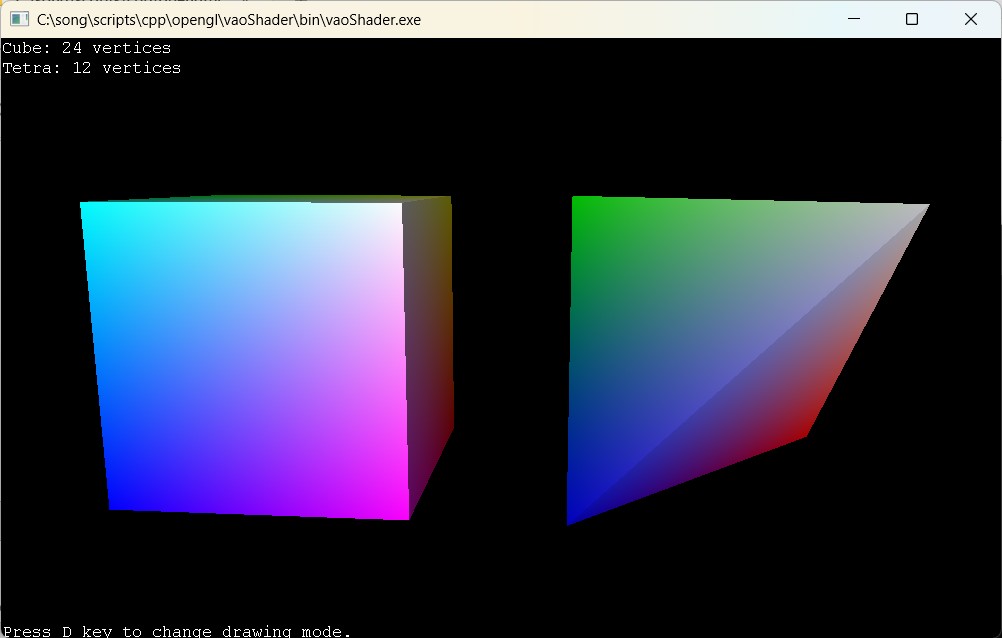
This C++ example is to draw a cube and tetrahedron with VBO and VAO.
Download: vao.zip (with freeglut), vaoShader.zip (with glfw)
A cube requires 24 vertices (6 faces) and a tetrahedron needs 12 vertices (4 faces). The following code prepares vertex array states for a cube using VAO and VBO, and draw it with glDrawElements().
// create VAO for cube ==============
// encapsulate vertex array states into VAO after glBindVertexArray()
GLuint vaoCube;
glGenVertexArrays(1, &vaoCube);
glBindVertexArray(vaoCube);

// create VBO for cube
GLuint vboCube;
glGenBuffers(1, &vboCube);

// store vertex data to VBO for cube
glBindBuffer(GL_ARRAY_BUFFER, vboCube);
glBufferData(GL_ARRAY_BUFFER, dataSize, vertexData, GL_STATIC_DRAW);

// create VBO for cube indices
GLuint iboCube;
glGenBuffers(1, &iboCube);

// store index data to VBO
glGenBuffers(1, &iboCube);
glBindBuffer(GL_ELEMENT_ARRAY_BUFFER, iboCube);
glBufferData(GL_ELEMENT_ARRAY_BUFFER, indexSize, indexData, GL_STATIC_DRAW);

// enable vertex array attributes for bound VAO
glEnableVertexAttribArray(attribVertexPosition);

// store vertex array pointers to bound VAO
glVertexAttribPointer(attribVertexPosition, 3, GL_FLOAT, false, 0, 0);

// unbind VBOs
glBindBuffer(GL_ARRAY_BUFFER, 0);
glBindBuffer(GL_ELEMENT_ARRAY_BUFFER, 0);

...

// draw a cube with VAO =============
// NOTE: no need to bind VBO or configure vertex states
glBindVertexArray(vaoCube);
glDrawElements(GL_TRIANGLES,            // primitive type
               36,                      // # of indices
               GL_UNSIGNED_INT,         // data type
               (void*)0);               // ptr to indices

